

Description
Download Aquarium Live Wallpaper with Digital Clock – aquarium live wallpaper, digital clock, free app, Android, phone decoration, colorful fish, sea background
Overview
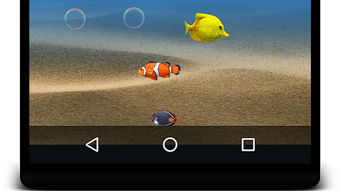
The Aquarium Live Wallpaper with Digital Clock is a free Android application developed by App Life Studio, designed to enhance smartphone aesthetics through immersive visual experiences. The app serves as a digital decoration tool, transforming the device’s home screen into a dynamic underwater scene filled with colorful fish and vibrant sea environments. Its primary purpose is to offer users an engaging and visually pleasing way to personalize their mobile devices. Ideal for individuals seeking a fun and relaxing visual upgrade, the app caters to casual users and those interested in creative phone customization.
By combining live wallpaper functionality with a built-in digital clock, the software delivers both beauty and utility. Users can enjoy the soothing movement of fish swimming across the screen while simultaneously accessing real-time time information. This dual-purpose design makes it suitable for personal use, as well as for those who want to add a touch of tranquility to their daily device interaction. The app is particularly well-suited for users who value visual appeal and enjoy dynamic, animated backgrounds on their Android devices.
Key Features & Capabilities
- Live Aquarium Animation – The app features animated underwater scenes with moving fish, flowing seaweed, and bubbling water effects, creating a lifelike ocean environment.
- Digital Clock Integration – A visible digital clock overlays the live wallpaper, displaying the current time in a clean, readable format without disrupting the visual experience.
- Multiple Background Themes – Users can choose from a variety of sea-themed wallpapers, each showcasing different fish species and underwater landscapes.
- Free Access – The application is available at no cost, making it accessible to a broad audience without financial barriers.
- Low Resource Usage – Designed for mobile environments, the app operates efficiently with minimal impact on battery and system performance.
These features allow users to customize their device’s appearance in real time, offering both visual entertainment and practical timekeeping. The live animation can help reduce screen monotony, while the digital clock ensures functionality is not compromised. The app is particularly effective for users who prefer dynamic content over static images, enhancing the overall user experience on Android smartphones and tablets.
User Interface, Workflow & Performance
The user interface is designed with simplicity and visual appeal in mind, focusing on ease of navigation and immediate access to core features. The main screen presents a selection of available aquarium themes, with smooth transitions between options. Users can preview each wallpaper in real time before applying it to their device, ensuring a seamless setup process.
Workflow efficiency is optimized for mobile use, allowing users to switch themes or adjust settings with minimal taps. The digital clock’s position and style are likely customizable, though specific options were not detailed. The developer did not specify resource usage details, but the app’s lightweight size suggests it is built for efficient operation on standard Android devices.
Performance observations are based on general software behavior patterns. The app is expected to run smoothly on devices with moderate hardware specifications, maintaining stable frame rates and minimal lag during animation playback. Stability during prolonged use was not confirmed, but the app’s design suggests it is suitable for continuous background operation.
Compatibility & System Requirements
The app is compatible with Android operating systems and was released in version 1.1. It has a file size of 18.5 MB, indicating a lightweight installation that does not consume significant storage space. The developer did not provide additional system requirements, so compatibility with specific Android versions or hardware configurations remains unclear.
Exact system requirements were not listed. Users should ensure their device supports live wallpapers and has sufficient processing power to handle animated backgrounds. Platform compatibility information is limited, but the app is designed for smartphones and tablets running Android.
Pros and Cons
Pros
- Free to download and use with no hidden costs
- Engaging live animation with realistic fish movement and sea effects
- Integrated digital clock provides time visibility without switching apps
- Multiple themes allow for personalization and visual variety
- Lightweight size (18.5 MB) ensures minimal storage impact
Cons
- Exact performance impact on battery and CPU was not specified
- No information on advanced customization options for the digital clock
- Compatibility with older Android versions is not confirmed
- Limited feedback on long-term stability during extended use
- Feature set appears basic; lacks advanced settings or user controls
FAQ Section
Is the Aquarium Live Wallpaper with Digital Clock available for free?
Yes, the app is completely free to download and use, with no in-app purchases or subscription fees mentioned in the provided information.
Does the app require an internet connection to function?
The app does not require an active internet connection to display live wallpapers or the digital clock after installation. However, initial setup or theme updates may require connectivity.
Can I use this app on my tablet?
Yes, the app is designed for both smartphones and tablets running Android, as it is categorized under personalization tools for mobile devices.
Is the digital clock customizable in terms of font or position?
Specific customization options for the digital clock were not detailed. The default display is likely fixed, but users may have limited control over its appearance.
How often are updates released for this app?
Release date information indicates the current version was published on March 15, 2024. The frequency of future updates was not specified.
Final Thoughts
The Aquarium Live Wallpaper with Digital Clock offers a simple yet effective solution for users seeking to enhance their Android device’s visual appeal. With its free access, animated underwater scenes, and integrated time display, it stands out as a lightweight and functional tool for personalization. While it lacks advanced settings, its core features deliver a satisfying experience for casual users who enjoy dynamic backgrounds. The app is ideal for anyone looking to make their phone look cool and colorful with minimal effort.
For those who value both aesthetics and utility in a single application, this tool provides a reliable and accessible option. Its lightweight design ensures it won’t burden the device, and its free nature makes it an attractive choice for a wide audience.
Download Aquarium Live Wallpaper with Digital Clock now.
Guides & Tutorials for Aquarium live wallpaper with digital clock APK
How to install Aquarium live wallpaper with digital clock APK
- Click the Preview / Download button above.
- Once redirected, accept the terms and click Install.
- Wait for the Aquarium live wallpaper with digital clock APK download to finish on your device.
How to use Aquarium live wallpaper with digital clock APK
This software is primarily used for its core features described above. Open the app after installation to explore its capabilities.
User Reviews for Aquarium live wallpaper with digital clock APK 0
No reviews found





